Intro

As a data analyst, I collect, organize, and scrutinize large datasets to derive meaningful insights. I identify trends and correlations within the data, creating reports and visualizations to effectively communicate my findings. By collaborating with teams and stakeholders, I address business challenges and provide essential information for data-driven decision-making. My role as a data analyst ultimately helps businesses and organizations enhance their operations and achieve a competitive edge through data-driven strategies.

In my work, I focus on several key areas to ensure comprehensive and accurate analysis: data collection, data cleaning, data exploration, data visualization.

Hr data analytics

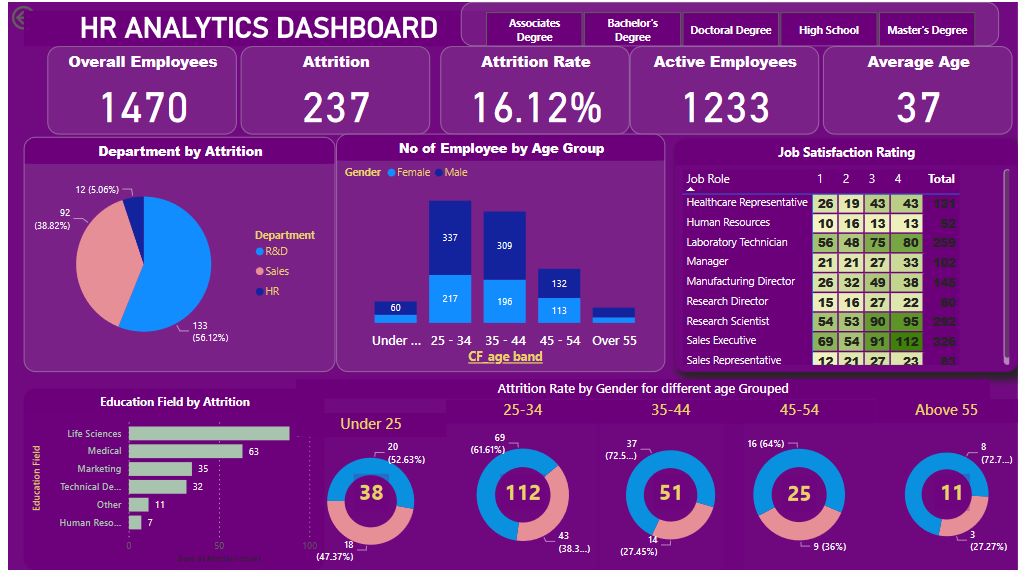
This is a project i made using power BI and Dax

The HR analytics dashboard provides a comprehensive view of employee attrition, helping HR professionals and management understand the factors contributing to turnover and identify trends. It combines data visualization and key metrics to offer actionable insights.

Electric vehicle analysis

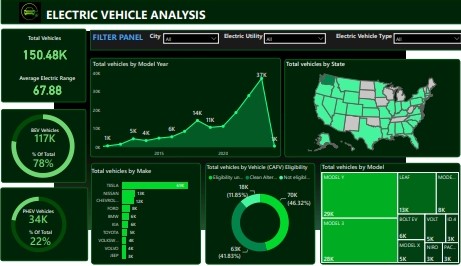
This is a project i made using power BI and Dax

The EV analysis dashboard provides a detailed view of various aspects of electric vehicles, including market trends, sales performance, charging infrastructure, and environmental impact. It leverages data visualization to offer insights that can inform business strategy, policy-making, and consumer behavior.

Sales data analysis

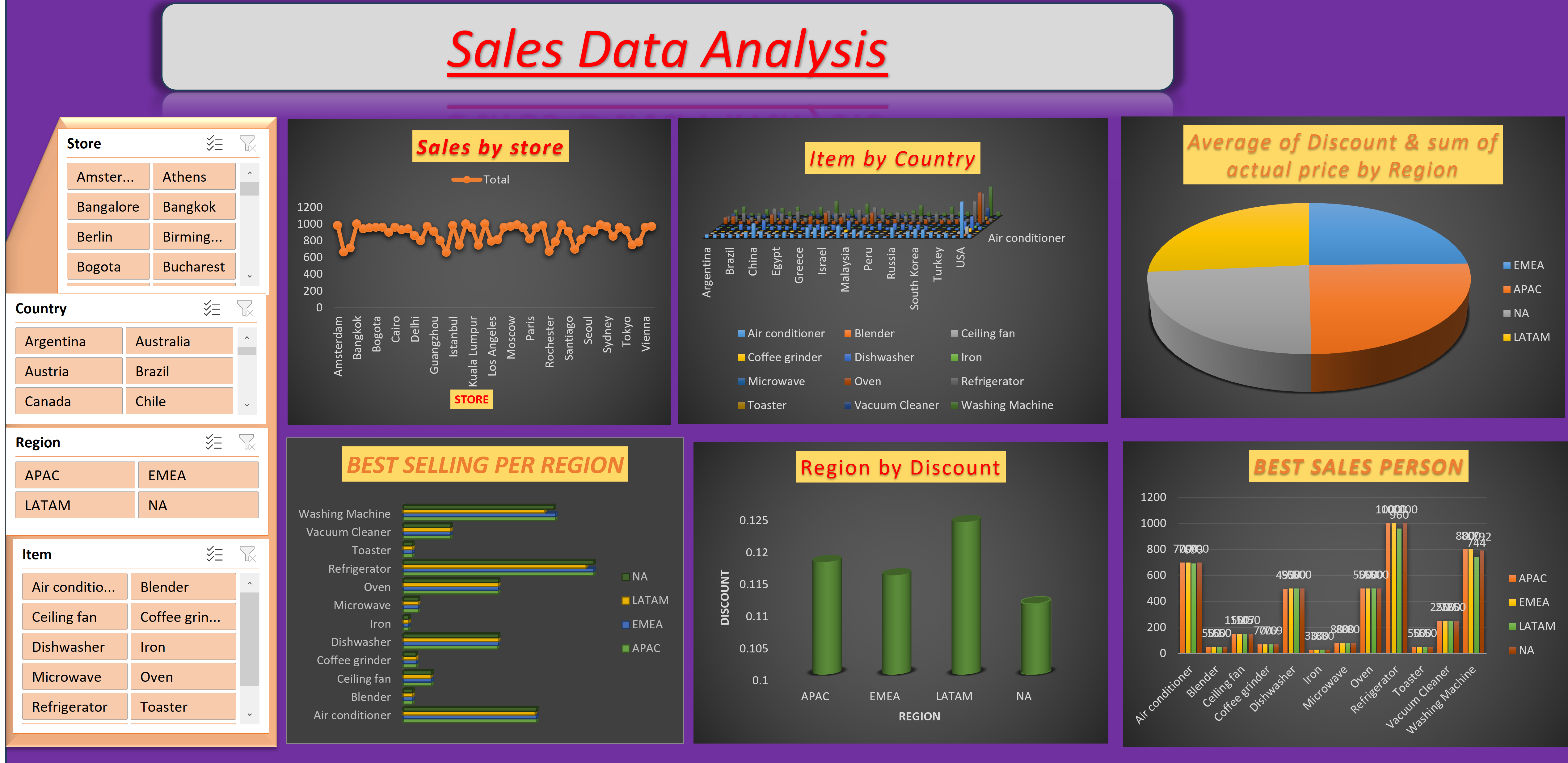
This project involved using Excel to clean the dataset and visualize the data with PivotTables and PivotCharts.

The sales data analysis dashboard in Excel, utilizing Pivot Charts, provides a detailed and dynamic view of sales performance. It enables users to slice and dice data to uncover trends, patterns, and insights essential for making informed business decisions..

World population Analysis

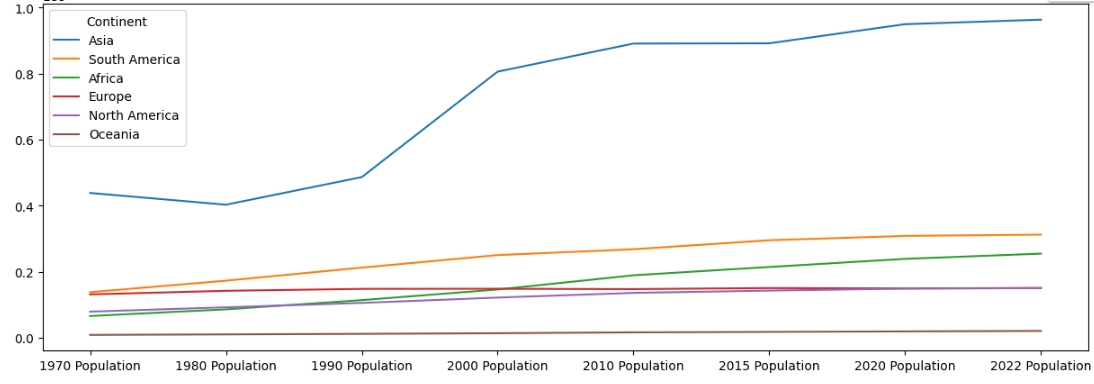
This project involved using Python in Google Colab for a comprehensive analysis of world population data. By leveraging libraries such as Pandas for data manipulation, Matplotlib and Seaborn for visualization, and the collaborative features of Google Colab, the project provides an in-depth examination of global population trends.

The world population analysis dashboard in Python, created in Google Colab, features interactive charts and graphs that offer a detailed and dynamic view of population data. Users can filter and explore the data to uncover trends, patterns, and insights essential for understanding demographic changes and making informed decisions.

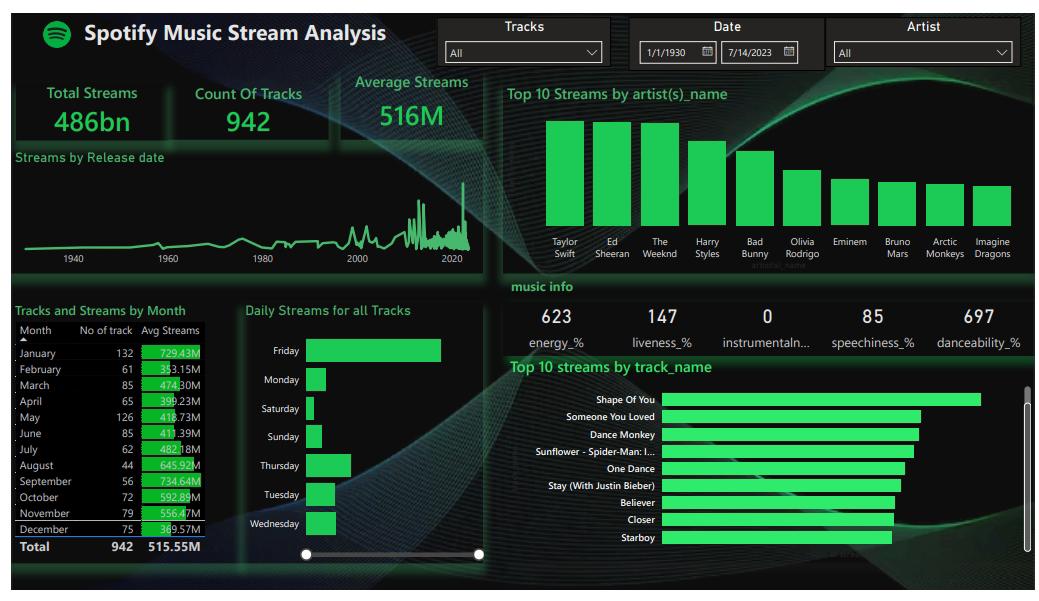
Spotify Music Stream Analysis

Dax, power query and powerBi.

The Spotify Music Stream Analysis dashboard in Power BI provides a comprehensive view of streaming data, enabling users to understand listener behavior, track performance metrics, and uncover trends in music streaming. This dashboard leverages Power BI's powerful visualization and interactive capabilities to present insights in a user-friendly manner.

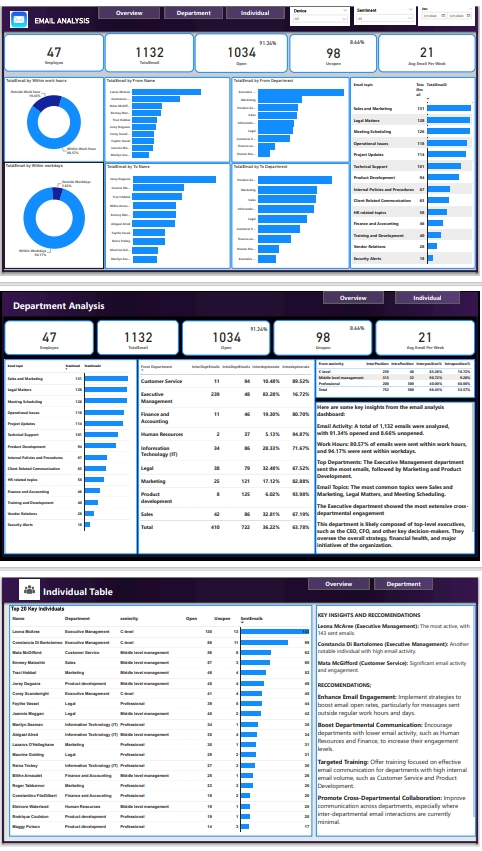
Email Analyis Dashboard

Dax, power query and powerBi.

The email activity report offers an in-depth perspective on email communications. By monitoring key metrics, it enables the analysis of email performance, which is crucial for refining engagement strategies and improving overall communication effectiveness.

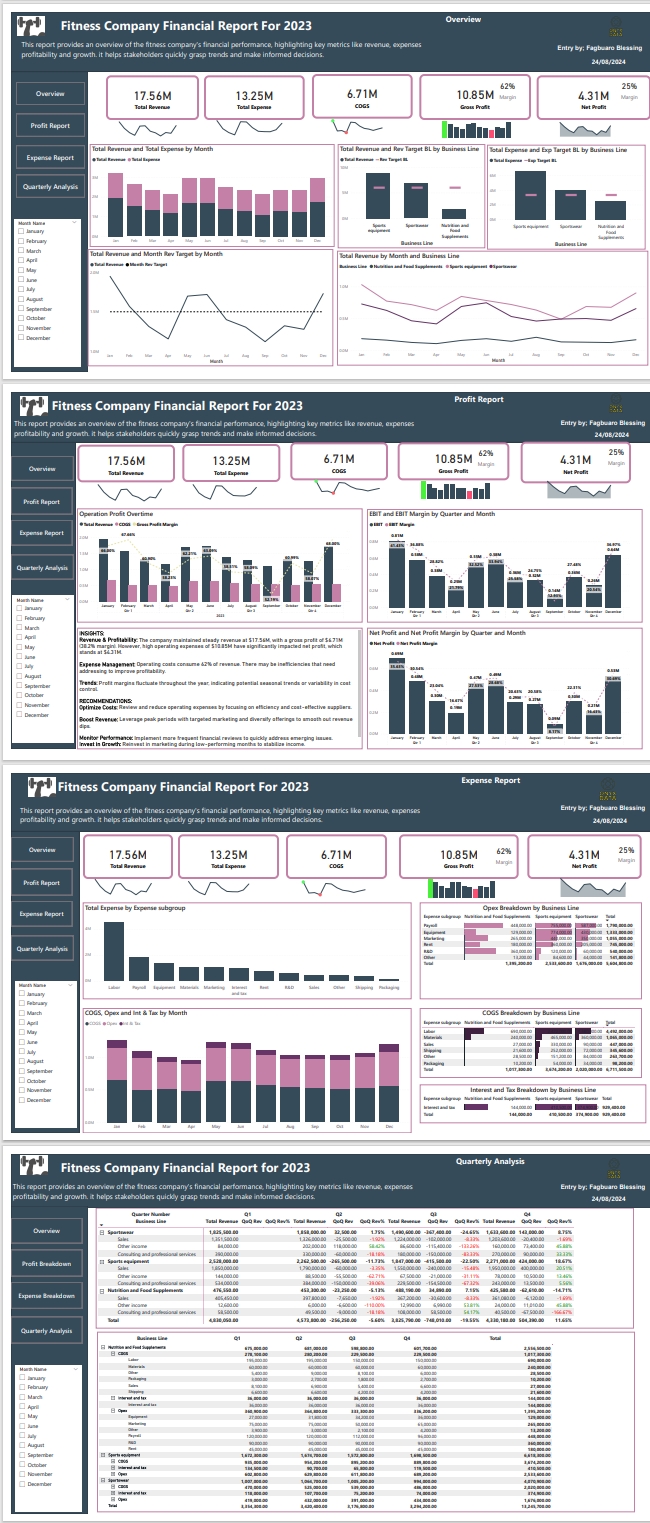
Fitness Company Financial Report Dashboard

Dax, power query and powerBi.

This report provides an overview of the fitness company's financial performance, highlighting key metrics like revenue, profitability and growth. it helps stakeholders quickly grasp trends and make informed decisions.

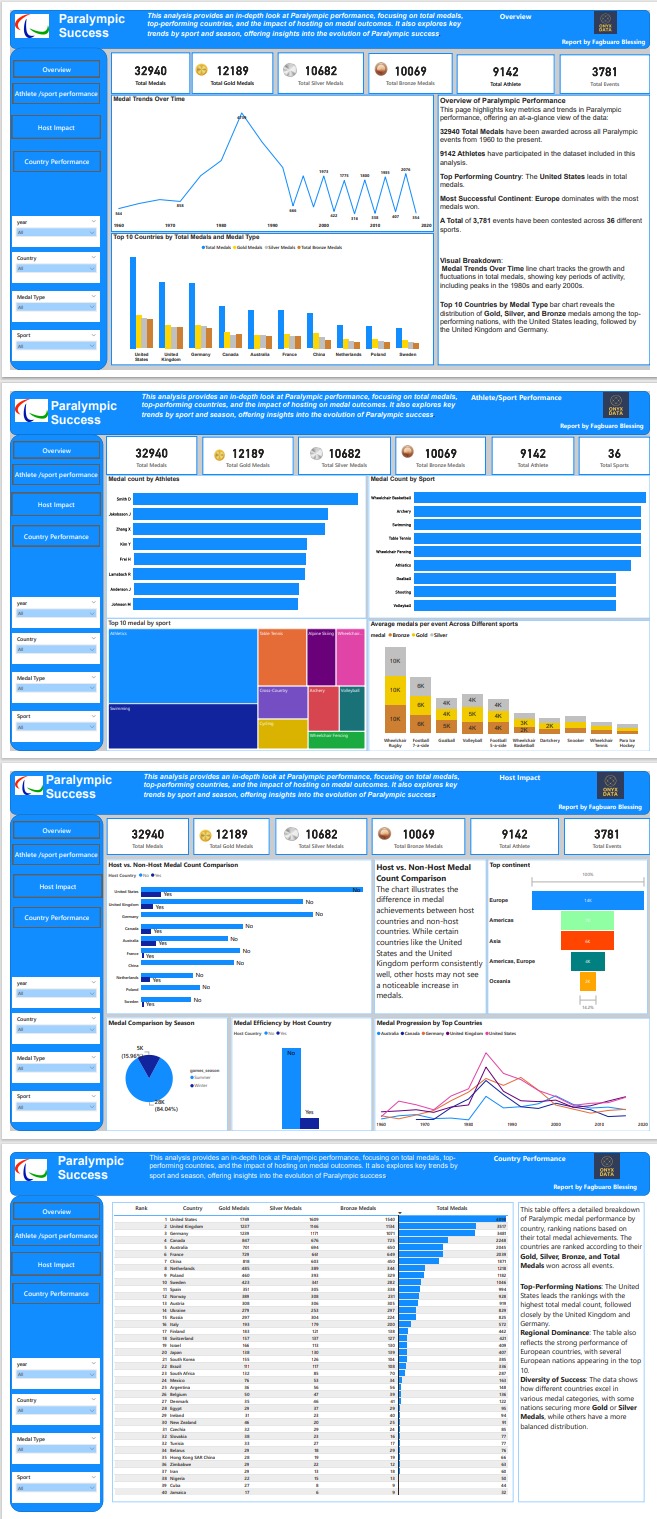
Paralympic Success Report

Dax, power query and powerBi.

This analysis provides an in-depth look at Paralympic performance, focusing on total medals, top-performing countries, and the impact of hosting on medal outcomes. It also explores key trends by sport and season, offering insights into the evolution of Paralympic success.

About

Hi there! I'm Fagbuaro Blessing, a Data Analyst with a strong background in data analysis and visualization. I specialize in transforming complex data into actionable insights using tools like Excel, MS SQL, Power BI, and Python.

Elements

Text

This is bold and this is strong. This is italic and this is emphasized. This is superscript text and this is subscript text. This is underlined and this is code: for (;;) { ... }. Finally, this is a link.


Heading Level 2

Heading Level 3

Heading Level 4

Heading Level 5
Heading Level 6

Blockquote

Fringilla nisl. Donec accumsan interdum nisi, quis tincidunt felis sagittis eget tempus euismod. Vestibulum ante ipsum primis in faucibus vestibulum. Blandit adipiscing eu felis iaculis volutpat ac adipiscing accumsan faucibus. Vestibulum ante ipsum primis in faucibus lorem ipsum dolor sit amet nullam adipiscing eu felis.

Preformatted

i = 0;

while (!deck.isInOrder()) {
    print 'Iteration ' + i;
    deck.shuffle();
    i++;
}

print 'It took ' + i + ' iterations to sort the deck.';

Lists

Unordered

  • Dolor pulvinar etiam.
  • Sagittis adipiscing.
  • Felis enim feugiat.

Alternate

  • Dolor pulvinar etiam.
  • Sagittis adipiscing.
  • Felis enim feugiat.

Ordered

  1. Dolor pulvinar etiam.
  2. Etiam vel felis viverra.
  3. Felis enim feugiat.
  4. Dolor pulvinar etiam.
  5. Etiam vel felis lorem.
  6. Felis enim et feugiat.

Icons

Actions

Table

Default

Name Description Price
Item One Ante turpis integer aliquet porttitor. 29.99
Item Two Vis ac commodo adipiscing arcu aliquet. 19.99
Item Three Morbi faucibus arcu accumsan lorem. 29.99
Item Four Vitae integer tempus condimentum. 19.99
Item Five Ante turpis integer aliquet porttitor. 29.99
100.00

Alternate

Name Description Price
Item One Ante turpis integer aliquet porttitor. 29.99
Item Two Vis ac commodo adipiscing arcu aliquet. 19.99
Item Three Morbi faucibus arcu accumsan lorem. 29.99
Item Four Vitae integer tempus condimentum. 19.99
Item Five Ante turpis integer aliquet porttitor. 29.99
100.00

Buttons

  • Disabled
  • Disabled

Form